Translate

Saturday, December 8, 2012

Using DBCC PAGE in Production Environment

We normally in the understanding that, we should never use undocumented commands in production like DBCC PAGE or DBCC IND etc. Recently, during a training, I got to know that there is no harm of using DBCC PAGE.

Only thing to worry here is, syntax or output or DBCC PAGE can be changed by Microsoft, WITHOUT SUPPORTING backward compatibility.

So it is perfectly safe to use valuable DBCC PAGE command but do not create automated task from DBCC PAGE, Use it for troubleshooting tasks.

Friday, December 7, 2012

Data Type Conversion Chart

This Illustrates all explicit and implicit data type conversions that are allowed for SQL Server system-supplied data types.

http://www.microsoft.com/en-us/download/details.aspx?id=35834

image

Thursday, November 22, 2012

Automatically Retry A SQL Server Job After A Failed Step

If you are running SQL Server jobs with numerous steps there can be failures due to network glitches or deadlocks. In such a scenario the DBA will typically restart the job from the failed step. However, there is an option in SQL Server Agent to automatically retry the job, which is under utilized by many DBAs. This faq will tell you how to do it.

Sunday, November 18, 2012

SQL Server 2012 SP1 is released

The latest SP1 has many new and enhanced features.

Few are following,

Selective XML Index
DBCC SHOW_STATISTICS works with SELECT permission
New function returns statistics properties - sys.dm_db_stats_properties


Download 1GB (!!!) size of SP1 from here.

Saturday, October 20, 2012

SSMS Report Security Bug

To view SSMS reports there are few security roles you need to grant. In SSMS there are three types of reports.

1. Server Reports

2. Database Reports

3. SQL Server Agent Reports

To view Server Reports you need VIEW SERVER STATE permission. To view database reports, you need db_datareader permissions. However, if you have any other permissions, following is what you see.

image

As expected, Standard Reports are disabled but reports which were opened before are in the list!! and you can run those reports as well.

Saturday, September 29, 2012

Database Mail has Locked the Domain Account

This was an incident happened to one of my colleague and I was part of troubleshooting team.   Winking smile

He was complaining that his domain account getting locked daily. Their domain has security configuration,

1. Password is expiring quarterly, every three months.

2. Three continues invalid attempts to login will lock the domain account.

Since I had the same issue before, I thought it might be a service. Once I have configured SQL Server  Express service account to login from my credential. Though I am not using this Express instance it has locked my domain account.

So I checked all the services but it went in vain.

We thought it is something to do with Outlook settings, which we reinstalled again didn’t work.

Then we stopped guessing and thought to approaching it more planned way and we started to examine the Security Log. (You would asks, “Why the hell you didn’t do that before” Angry smile)

Well, we found a clue there and it says logon failures for database mail.

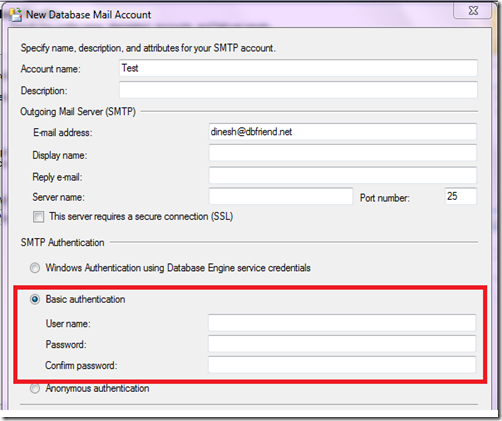
Then examine the database mail configuration, yeap! we got it. SMTP authentication was set with Basic authentication instead he could have done with Windows Authentication.
image

After configuring database mail later his password has expired but since he has used basic configuration, still database mail was trying with the previous password. In his database server, there is job to send notification using database mail. with this job database mail getting executed and with that domain account is getting locked.

Friday, September 21, 2012

Largest SQL Server Installations in the World

I was watching the 24hrsofPASS yesterday and came across the Kevin Cox presentation on PASS - What are the Largest SQL Server Projects in the World?

Following are the statistics for SQL Server world wide.

image

Following are most valued SQL Server clients.

image

Here are some statistics for bwin.

image

Sunday, September 16, 2012

Internal Version of SQL Server Databases

SQL Server has an internal version for it’s databases which as users you don’t need to know about them. But, in some cases like, attaching databases and restoring them between different version you will end up with error messages indicating these internal version numbers. So you need to know about these version numbers.

Following is the error message I received, trying to attach database which was built in SQL Server 2012 and surprisingly my target server is also SQL Server 2012.

image 

It says my current SQL Server version is 705 while I am trying to attach a database of version 706. But both are SQL Server 2012.

Though both are SQL Server 2012, 705 stand for SQL Server 2012 RC0 while 706 stand for SQL Server 2012 RTM!

Here are the internal versions of different SQL Server versions.

image

This blog post describes about how to measure the version number and other aspects of it.