Translate

Showing posts with label Text Analytics. Show all posts

Wednesday, October 20, 2021

Simple Rule Based Text Classification using Orange Data Mining

Typically, we use a lot of algorithms to perform simple classification such as Decision Trees, SVM, Naive Bayes, Logistic Regression etc. How about using simple rules. For example, can't we look at some specific words to define whether it is a positive or negative sentiment? how about words like pathetic, worst, poor for negative sentiments whereas great, fabulous, superb for positive. 

Let us see how we can use the Orange Data Mining tool to achieve the above objective. Following is the Orange Data Mining flow.


You can download the workflow from the Github  dineshasanka/Orange-Data-Mining---Text-Analyitics (github.com) 

Let us explain the package one by one. 
1. From the import documents, a film review data set was extracted.
2. Preprocess Text was used to convert the texts to lowercase and remove some URLs. 
3. Statistics is the key component in this package. This is where you identify the keywords.


4. Then using two aggregate columns were used to create two POS and NEG columns. This will sum the two positive and negative sentiments to the two columns.


5. As of now this is the dataset. 


6. Two feature constructors were introduced. If you are good at Python you can use a Python Script component. 

7. Depending on the positive and negative keywords, we can introduce a new column predicted as follows. 


8. Let us look at the confusion matrix from Pivot table control.

You can see that it has 70% accuracy while more than 85% accuracy for negative sentiments. 

This technique shows that you do not need to rely on complex algorithms but a simple technique will give you more accuracy. 

Monday, October 4, 2021

Orange Data Mining - Text Processing

During the last few blog posts, we have discussed how Image processing can be used for different purposes using the popular Orange Data Mining tool. Now let us move our discussions to Text analytics another one of the complex data sources. 
Text tab in the Orange Data Mining tool is not available by default and that has to be added to the tool by updating the add-in. From time to time, there can be updates that have to be added periodically. 

Now let us see what are the basic functions of the Orange Data Mining for Text Analytics.


Today let us use a few and important features for Text Mining. As you can see, there are existing corpora (Text datasets) for you to use as shown below. 


Further, if you have proper access, you can extract data from NY Times, Pubmed, Twitter etc. 

Let us use the customized dataset to perform simple text preprocessing technique. By using, Import Documents widget.  IMDB review dataset was used as it has 2000 positive and negative reviews. You can download the relevant Orange Data Mining workflows from this link. https://github.com/dineshasanka/Orange-Data-Mining---Text-Analyitics.git and following the entire workflow.


After the 2000 documents are imported, we need to perform some preprocessing techniques in order to clean data. This is something very important task in text analytics as you tend to see a lot of issues with the text due to the free form nature of text data. 


The above configuration covers basic preprocessing techniques, Tokenization, filtering and transformation. In this example, we have not used other available preprocessing techniques such as N-Gram, normalization and POS tag. 
Tokenization will decide how would to separate words from the sentences and the filter will decide to remove unnecessary words. Since we have used English stopwords and customized text to remove the non-semantic words. The basic transformation was done by removing URLs and converting the text to lowercase. 
Now you can visualize the words in the word cloud as shown in the following screen.


Apart from word cloud analysis, you can perform simple statistics on your text documents using the Statistics widgets. 

Then you can view the data either from a data table or from the feature statistics.  

Tuesday, August 24, 2021

Language Detection using Python


Language detection is an important functionality in Natural Language Processing (NLP) as Language detection is the basic pre-processing task that you perform. In the previous article, we discussed how language detection can be done using Azure Machine Learning. 

Let us do the same task for same dateset using python. Language Detection.ipynb - Colaboratory will provide the entire python code and let us understand the code step by step. 

First let us import the relevant libraries. 

!pip install textblob polyglot spacy spacy_cld langdetect langid 

Let us add the sample code with different languages. 


Following code will detect the language and display  the language code.
 

One of the important task in language detection is detecting the required language. Following simple query will display the English texts.


Thursday, July 8, 2021

Article: Latent Dirichlet Allocation in Text Analytics

Latent Dirichlet Allocation or LDA is a statistical technique that was introduced in 2003 from a research paper. LDA is used for topic modelling in text documents. LDA is more often analogue to PCA that we covered before. If you remember in PCA, we used to generate a single value for the existing values in a dataset. LDA will generate a topic for documents by analyzing the content of the document. This technique can be used to cluster documents as well which is an important task in text analytics.

Read the full article at Latent Dirichlet Allocation in Text Analytics

This is ToC for the Azure Machine Learning Series.

Introduction to Azure Machine Learning using Azure ML Studio


Azure Machine Learning: Named Entity Recognition in Text Analytics


Monday, June 21, 2021

Data Analysis for Singlish Texts

Like many other non-English nations, we Sri Lankans used to type Sinhala words using English text. Though there are many word processing tools and apps are available for Sinhala texts, still, we see a lot of people use Singlish words. 
Not only these Singlish texts are difficult to read, at the research level there are difficulties in identifying these words.
In every text related research, the first task would be identifying the Language. We have discussed how to detect a language using Azure machine learning in a previous article
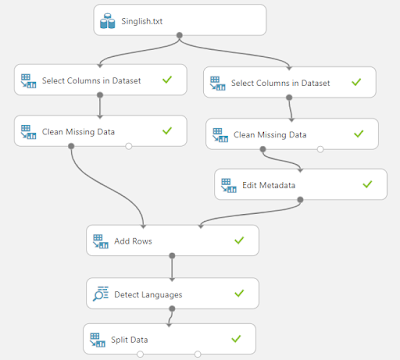
This post is to look at whether we can detect Singlish text using Azure Machine Learning. The following is the configured Azure Machine Learning experiment.


You can download the experiment from the Azure AI gallery. Let us look at some important findings in this experiment. 

Out of the 1400+ texts, 35% were identified as English may be due to the fact that letters are in English. Then the big surprise is much Singlish texts were identified as Indonesian and Romanian and the percentages are 26%, 13%. Not sure there is a relationship between the Singlish language with Indonesian and Romanian languages. 
Another important finding is that Singlish texts are identified as 40 different languages such as Maly, Turkish, Polish, Irish etc. 


Thursday, May 13, 2021

Azure Machine Learning: Named Entity Recognition in Text Analytics


Recognition of Entities in Text Analytics is an important process in Text Analytics in order to find People, Places and Organizations. Named Entity Recognition in Azure Machine Learning is used to identify the name of entities such as people, locations, and organizations, etc. The Named Entity Recognition control will provide where the particular entity exists as well as this technique will help us to understand the context of a text.
The latest article explains how to recognize Named Entities in Azure Machine Learning. Following are the rest of the articles in the series.

Thursday, April 29, 2021

How to Build Recommender Systems with Customer Review Data

Text Analytics is a complex and challenging task due to the fact that it has a variety of data.  In a previous blog post, we looked at how recommender systems were used by Amazon to improve sales of one book
This Azure Machine Learning Experiment shows to build Recommender systems for customer Review Data. 

References for Datasets
https://jmcauley.ucsd.edu/data/amazon/
Ups and downs: Modeling the visual evolution of fashion trends with one-class collaborative filtering R. He, J. McAuley WWW, 2016 pdf

Image-based recommendations on styles and substitutes J. McAuley, C. Targett, J. Shi, A. van den Hengel SIGIR, 2015 pdf


Sunday, April 18, 2021

Latent Dirichlet Allocation in Azure Machine Learning

Latent Dirichlet Allocation (LDA) is a Topic modelling technique that used in Text Mining. This technique was first introduced in 2003 by this research paper. 

LDA can be achieved in the Azure Machine Learning platform as it has specific LDA control. This is the experiment that was created in the Gallery with more than 50 Azure Machine Learning controls. 

Friday, March 19, 2021

Film -> Positive , Movie -> Negative, Class Association Rule for Movie Reviews

Sentiment Analysis has become an important as well as tedious Business Task in order to explain how customers think about different products and services. 

Apart from simple sentiment analysis, you would like to know what makes your product better or worst so that you improve your products and services. Classification Association Rule (CAR) is used to find what makes your product positive or negative. 

WEKA supports the CAR option in association and let's see how we can utilize this feature.  

We have used the Film review dataset which has 2000 reviews for 1000 each for positive and negative reviews. 

By using, String to Word Vector in Weka, texts were converted to Binary Vector and Loving Stemmer, Rainbow stopwords and Alphabetic Tokenizer were used. 

In order to support, Association Rule in WEKA data set was modified and can be downloaded here

The sample of data is here. 


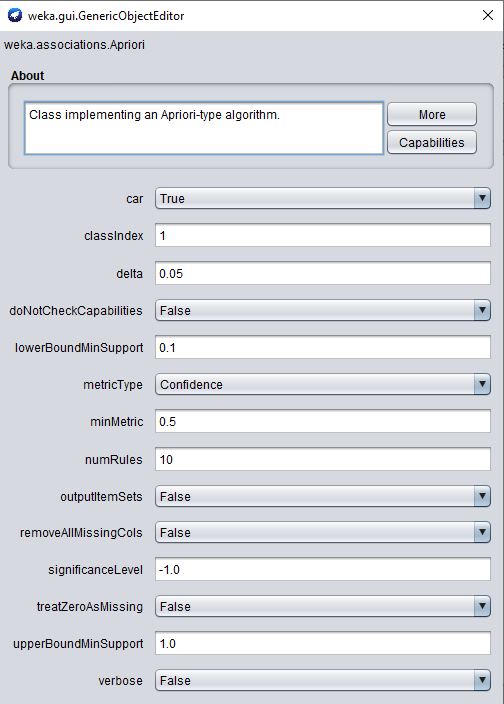
Apriori algorithm is used to find the association rules with changes as shown below. 


In the above configuration, the CAR option set to TRUE and the class index is set 1. The class index indicates, what is the index of the class parameter. Since it is the first parameter in the dataset, 1 is selected. minMetric also set 0.5 as we may not have rules for higher confidence values. 
Let us see the results. 

What do these rules say? If you look at rule 2 when the text "movie" exits review is negative. Please note that "movie" text is stammered to "movi" . The rules such as 3, 4, 5, and 8 say, text "film" tends to indicate positive review. 
This is an astonishing finding as film and movie are synonyms but they tend to have completely different sentiments.