Translate

Showing posts with label Index. Show all posts

Thursday, January 27, 2022

Indexing : Adding jet fuel to your car

In database technology indexes used to improve the performance of select queries that can be seen from the following figure. 


This post is to show case different cases for indexes using different articles. This article SQL Server Clustered Index Behavior Explained via Execution Plans will tell you how different scenarios are for Clustered Index. 
However, indexes needed to be maintained using rebuild and reorganizing SQL Server Maintenance Plan Index Rebuild and Reorganize Tasks 
How do we know what is the better index and where the indexes are needed. This can be done Troubleshooting using Wait Stats in SQL Server and specially How to Avoid CXPACKETs? . Another place indexes are Internals of Physical Join Operators (Nested Loops Join, Hash Match Join & Merge Join) in SQL Server .
Column indexes are another important aspect and Script to Create and Update Missing SQL Server Columnstore Indexes.
Furhter we have discussed few more cases for index before at here 
Happy reading into this. 


Thursday, October 21, 2021

Resumable Index Rebuilding in SQL Server 2017

Index rebuild is one of the important tasks in Index Maintenance. As you know Index Rebuild run in a Transaction which means if you abort the Index Rebuild, you have to start all over again. Index Reorganizing is not under Transaction which means you can start from where you left. However, Index Rebuild will solve both Internal and External Index Fragmentation, Index Rebuild is the better option that you would like to go. 

As Index Rebuild will consume a lot of resources from the system, many users would like to perform Index Rebuild in a scheduled manner. This is now possible with SQL Server 2017 and SQL Server 2019. This feature is called the Resumable index. 

Let us see how we can demonstrate this feature. Let us create a table and populate it with the following code.

CREATE TABLE SampleData (ID INT IDENTITY(1,1) PRIMARY KEY CLUSTERED,
Name CHAR(1000),
AddressI CHAR(100)
)


INSERT INTO SampleData
(Name, AddressI)
VALUES
('DINESH','AddressI')
GO 2000000
Now we can rebuild the index with the RESUMABLE option is set to ON.

ALTER INDEX [PK__SampleD] ON [dbo].[SampleData]
REBUILD WITH (ONLINE = ON, RESUMABLE = ON);

Now you can PAUSE and RESUME the index. 

ALTER INDEX [PK__SampleD] ON [SampleData]  PAUSE


ALTER INDEX [PK__SampleD] ON [SampleData]  RESUME

After pausing the index, you can see what percentage of index rebuilding is done with a few other details.

SELECT total_execution_time, percent_complete, 
   name,
   state_desc,last_pause_time,
   page_count
FROM sys.index_resumable_operations;


However, until you complete the index rebuild, the transaction log is utilised which is an important fact to remember. 


Monday, January 11, 2021

Another Confrontation for Indexes

Source: https://medium.com/analytics-vidhya/anatomy-index-in-relational-db-a1425f2d8a02

Indexes are seemed to be a never-ending topic. It is very difficult to convince application developers regarding the indexes. This is another instance of such. 

A user complained saying that they are getting continuous timeouts from their application during some processing. They insisted that it is a problem with the server resources. Since the server in question is housing more than 30 databases, that cannot be the reason. Further, even this application is working nicely with other queries but not with one particular query. When the requested for the particular query, it was not provided as the basic conclusion is that this is due to the server resources. Then the development team insisted to have a look on the database server which we did. At that time, server memory was 97% with CPU is at 4%. So, naturally, all were pointing the guns at server memory. The server memory is something that I have been elaborating to the users over the years, but with little success. It was very difficult to make them believe that database is a different animal is altogether. 

Finally, I got the table name even though I could not get the exact query. Well, the table has more than 300,000 records with one clustered index on the identity column. I was told that there process this table for each user. They were having around 1,500 users. That means the query in question, is doing table scans of 300,000 * 1,500. This table had more than 100+ columns but still, I couldn't make them satisfy that this an index problem. Then I offered them to delete a few records and check. Well, with fewer data their query worked nicely. Finally, they accepted it was an index issue, but for that more than 4-5 hrs were spent like the previous incident on the index.

Learnings from the incident

#1 - Increasing the hardware resource will not the first solution, there can be more other options than that. 

#2 - Don't be panic seeing that the server memory of a database server is hitting 90+%. That is how it is. You should worry if it is not. 

#3 - Index can do wonders for you only if you know the index concepts. 

If you need more details on Index read this article.

Monday, October 5, 2020

40 Kms Journey to Create an Index

 A client called and they had a slow system. Their complain was very simple.

They are a garment production company. Those garment items are flowing in a belt and there are workers who have a task of swiping the picked item to the bar code reader. Their complaint was that it takes more than 5 secs to read one production item. Their experience is that at the start of the season, this was around 1-2 seconds. When this is taking more than 5 seconds, they archived the data to solve the issue. However, they are looking at a permanent solution as this has been troubling them for a while.  

Well, by the looks of it is very obvious that issue is an index. However, it was difficult to convince the customer, mainly client was not able to identify what is the index he should apply. Well, then it is decided to make the physical appearance by driving 40 kilometres.

At the client site, it took only ten minutes to find the troublesome query. SQL Profiler was initiated while asking the users to continue with the normal operations. The query was identified from the profiler and verified it by running it in the SQL Server Management Studio as in the query plan CX_PACKET was identified.

Then the index was applied to cover the where clause condition as it had only one column in the where clause. Well, 5 seconds was reduced to almost zero seconds making users very happy as they can earn more as an extra bonus.

The index is the most common problem in the database systems. However, the art of the index is identifying and creating them. It is something that needs a bit of experience. 

If you need more details on Index read this article. Further, if you need more details on CXPACKET, this is the article. 

Tuesday, October 30, 2018

Script to Create and Update Missing SQL Server ColumnStore Indexes

SQL Server columnstore indexes are helpful when it comes to retrieving large volumes of data.  However, there are instances where columns are added to the table after the columnstore index was created. This means the new columns are missing in the columnstore index. Also, there can be cases where new tables are added and a columnstore index was not created.  In this tip we will look at how we can identify these cases and create scripts to create the index.

https://www.mssqltips.com/sqlservertip/5742/script-to-create-and-update-missing-sql-server-columnstore-indexes 


Monday, November 30, 2015

How to Avoid CXPACKETs?

CXPACKET is one of the famous wait type that database administrators are experiencing. Before moving into the details of CXPACKET wait type, - See more at: http://www.sqlshack.com/how-to-avoid-cxpackets/#sthash.lnQI7Ouh.dpuf

Wednesday, November 19, 2014

Improved Online Operations in SQL Server 2014

Online indexing rebuilding was a major breakthrough from SQL Server to support users re-indexing while the clustered index (or table) and other indexes are available during the index rebuild operation.   However, in real world there are multiple issues with these online operations as it does not have much flexibility. In SQL Server 2014, there are few options included for these online operations which is discussed in this article.

Saturday, June 1, 2013

CREATE INDEX vs ENSURE INDEX

When creating an INDEX in many database systems we use, CREATE INDEX statement. However, in MongoDB command is ensureIndex. Reason for this is, ensureIndex will ensure there is an index on given attribute. CREATE INDEX will create an index on given columns for given index name.

Also, if you execute CREATE INDEX twice second execution will fail. However, in ensureIndex multiple execution will not fail.

Sunday, April 21, 2013

INCLUDE Index Column Order

You can create an include index as shown below.

USE [AdventureWorks2012]
GO

CREATE UNIQUE NONCLUSTERED INDEX
[AK_Product_ProductNumber] ON [Production].[Product]
(
[ProductNumber] ASC
)
INCLUDE (
[Class],
[Color]
)
GO

So in this there are two columns are included in INCLUDE clause. So the question is, will the column order matters?


Since it is not only the columns in the SELECT list that need to be present in the INCLUDE clause, order of those columns is irrelevant.


However, if you look the UI of INCLUDE index, you will see following screen.


image


In the above screen, you can see that there is an option of changing the order by pressing Move Up or Move Down buttons.


So the question is, if the order of the columns is irrelevant, why you have an option of changing it?

CREATE INDEX Options

Like a series of SET Options, thought of doing another series on CREATE INDEX options in coming weeks.

These are the available options,

image

Saturday, April 6, 2013

BIT Column Indexes

There are two myths around BIT column indexes.

Myth #1. Cannot create indexes on BIT columns.

Not sure how this was evolved. But this not absolutely false. Let us try it.

USE tempdb
GO

CREATE TABLE
Employee
(ID INT IDENTITY PRIMARY KEY CLUSTERED,
Name Varchar(50),
Status BIT
)

CREATE INDEX idx_employee_status ON Employee(Status)

Above statement is successful and you can create the index is created.


image


I verified this in SQL Server 2000 SP4 and it was successful.

Myth #2. BIT Column indexes are not useful.


Above argument has a base. BIT column can have possible three values, 0, 1 and NULL. Therefore index selectivity is low.  For example, consider the above table which has 10 million rows and status will say whether these are active or not.  In large table, active records will be very less so active = 0X1 will be highly selective.

Wednesday, March 13, 2013

Thursday, March 7, 2013

Filtered Indexes with FORCE SEEK

If you closely analyzed the below query, you will see that there is a non-clustered filtered index on ScrapReasonID column and filter condition is ScrapReasonID = 17 . In the query, there is a force seek with the above index but the where condition is 30. So, you can see there is an contradiction between index and query filter condition.

image

So what do you think about the output of the above query.

You will think that index hint will be ignored.However, this is the output for the above query.

Msg 8622, Level 16, State 1, Line 2
Query processor could not produce a query plan because of the hints defined in this query.
Resubmit the query without specifying any hints and without using SET FORCEPLAN.

Wednesday, December 26, 2012

How to measure the percentage of online index rebuild


Rebuilding indexes online is time consuming hence many DBAs need to monitor the event. There is a profiler event in SQL Profiler to capture the online index rebuilding.

In SQL Profiler, there is an event Progress Report: Online Index Operation under Progress Report category.

clip_image002

When this profiler is executing results can be obtained. Most of the columns are common like application name, database name spid , login etc. However, there are few uncommon columns which are shown in the below image.

clip_image004

Index ID – index ID from for the table.

Object Name : Index Name

BigIntData1: 0 = serial plan; otherwise, the thread ID during parallel execution.

BigIntData2: Number of rows inserted.

In the above example, non-clustered index BigintData2 in 0 which means index rebuild was done using a serial plan. In that example if you consider the BigintData1, it shows the cumulative rows rebuild. Since this table has 20,000 records last row for BigintData2 shows that number.

If you consider the clustered Index, there are 8 parallel plans have created to rebuild the indexes. If you sum all the max value for each plan, that again adds up to 20,000.

Saturday, August 18, 2012

Columnstore Index

Traditional indexes are based on rows where data is grouped and stored in row basis and then join all rows to complete the entire index. Columnstore indexes store data for columns and join the columns to complete the indexes. This type of index is helpful when retrieving data from large tables such as database warehouse fact tables for queries such as queries for filtering, aggregating, grouping.

Let us create a Columnstore index and compare the results with standard non clustered index.

Expand the Indexes tab inside a table where you want to create the Columnstore index. Right click Indexses and select New Index. Under this, you will see in the below image, a new option called Non-Clustered Columnstore Index…

image

With this you will be taken to the index creation dialog box. Here, Date column is used to create the Non-Clustered Columnstore Index for FactFinance table.
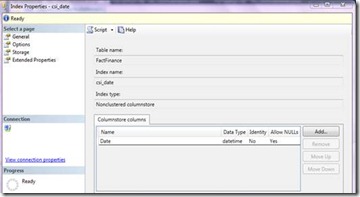
clip_image002

Similarly, you can use T-SQL scripts to create Columnstore Indexes. Following script will create an index on FactFinace table in the AdventureWorksDenali database.

USE [AdventureWorksDWDenali]

GO

CREATE NONCLUSTERED COLUMNSTORE INDEX [csi_date] ON [dbo].[FactFinance]

(

[Date]

) ON [PRIMARY]

GO

To compare the results of Columnstore index with traditional index, let us create standard Non-Clustered Index on the same date column as shown in the below dialog box.

clip_image004

So Index creation also has a different interface. Also, in SQL Server 2012 filtered index creation has an interface support which is not there in previous versions.

After creating those indexes you will see following indexes in the SQL Server Management Studio.

clip_image005

So you have a different icon for the Columnstore index.

Let us try to retrieve some data using above to indexes.

You will see that same query is executing at but with different indexes. More rows are added to this table so that you can visualize the different. This table has 2522176 Rows.

USE [AdventureWorksDWDenali]

GO

SELECT DISTINCT [DATE]

FROM dbo.FactFinance WITH ( INDEX = [csi_date])

ORDER BY [DATE]

GO

SELECT DISTINCT [DATE]

FROM dbo.FactFinance WITH ( INDEX = [nci_date])

ORDER BY [DATE]

GO

Let us first analyze the execution plans for both queries.

clip_image007

From the above image, you can see that Query 1 (which uses the Columnstore Index) has 4 % cost while the Query 2 (which uses the Non-Clustered index) has cost of 96 %.

Let us now examine these queries with SET STATISTICS IO, TIME ON


With Columnstore Index

With Non-Clustered Index

CPU Time

16 ms

451 ms

Execution Time

35 ms

2,986 ms

Read Count

49

18,316

Above results will tell you that columnstore is far better than the standard index. However, you need to analyze this case by case as for some cases having a Columnstore index will have negative impact.


Limitations

Following are the limitations of Columnstore Indexes.

· Cannot be Clustered Key or Primary Key

· Columnstore index has to be a Non-Clustered Index and it can be neither Clustered Key nor Primary Key.

· Cannot update tables with Column and following error will return if you try to update a table which has a Columnstore index.

Msg 35330, Level 15, State 1, Line 1

INSERT statement failed because data cannot be updated in a table with a columnstore index. Consider disabling the columnstore index before issuing the INSERT statement, then rebuilding the columnstore index after INSERT is complete.

· You can have only once Columnstore Index per table. After creating the first Columnstore index, option to create Columnstore Index will be disabled and if you try to create the index using T-SQL script following error will be returned.

Msg 35339, Level 16, State 1, Line 2

Multiple nonclustered columnstore indexes are not supported.

· Cannot be created with the INCLUDE keyword.

· Cannot be a unique index.

· Cannot be created on a view or indexed view.

· Cannot include a sparse column.

· Cannot have more than 1024 columns.

· If you need this much of columns for the Columnstore indexes, then obviously there is something wrong with the design.

· The following data types can be included in a columnstore index.

o Char, varchar, nchar and nvarchar (except varchar(max) and nvarchar(max))

o decimal (and numeric) (Except with precision greater than 18 digits.)

o int, bigint, smallint, and tinyint

o float and real

o bit

o money and smallmoney

o All date and time data types (except datetimeoffset with scale greater than 2)

· The following data types cannot be included in a columnstore index.

o binary and varbinary

o ntext, text, and image

o varchar(max) and nvarchar(max)

o uniqueidentifier

o rowversion (and timestamp)

o sql_variant

o decimal (and numeric) with precision greater than 18 digits

o datetimeoffset with scale greater than 2

o CLR types (hierarchyid and spatial types)

o xml

· Cannot Modify

Simply you are not allowed to use ALTEX INDEX syntax against Columnstore Indexes to modify the index. Drop and re-create the Columnstore index instead. Of course, if you want to disable or enable index, you can use ALTER INDEX syntax.

Monday, July 23, 2012

Database Tuning Advisor (DTA) Naming Conventions

DBAs are using Database Tuning Advisor a.k.a. DTA get recommendations for better performance of their databases.

Following is the index script created from the DTA.

image

in this index name is _dta_index_Contact_13_341576255__K1_4_6 and people might think that this does not have any standards, but it does have a standard.

You have four parts in this index naming.

image

A

This is straight forward. It is the object name or the table name.

B

13 is the database id for the Adventureworks.

image

C

Object Id of the contact.

image

D

Columns order of the key columns.

image

Wednesday, May 2, 2012

What is Best for Table Scan? Clustered Index or No Index

Always we believe Clustered Index is the best. However, what it will for table scan.

Here is the simple test of it.

First let me create a data to play around.

image

Then let me create a table with clustered primary key.

image

Then populate some data. Following script will some time to populate considering the page splits.

image

Then let me create a table with no index.

image

As before let me populate same set of data to the table with no indexes.

image

Now let us select data from both tables.

image

Following times shows that table with index has taken more time to read than table with no indexes.

image

and execution plan confirmed it.

image

Question is why?

Let us see the fragmentation on tables.

image

Result is,

image

So this tells you the story. Since you have clustered index, there are fragmentations. In the above scenario, table with clustered index has 26,330 pages while table with no index has 18,519 which is why table with no index is faster.

Ok, let us do rebuild the index and rerun all the queries with clearing the cache. Executions plans are 50/50.

image

Let us see number of pages for both cases.

image

In this you can see pages are high in table without any indexes. However, you will see that querying the entire table is slightly higher in the table with clustered index.

Here is the sample script you can play around.