Translate

Showing posts with label SET Statment. Show all posts

Friday, April 5, 2013

SET ANSI_NULL_DFLT_ON & SET ANSI_NULL_DFLT_OFF

This is the ninth post of SET Statement series.

By default when you add a column to the table without specifying the nullability , column will be nullable.

If you run this script,

CREATE TABLE Test
(ID INT)

table will be as follows.


image


You can change the behavior of this by SET ANSI_NULL_DEFT_OFF to ON as shown below.

SET ANSI_NULL_DFLT_OFF ON

CREATE TABLE
Test
(ID INT)

image


You can see that nullability of the column is off.


When SET ANSI_NULL_DFLT_ON is ON, new columns created allow null values if the nullability status of the column is not explicitly specified. When SET ANSI_NULL_DFLT_OFF is ON, new columns created does not allow null values if the nullability status of the column is not explicitly specified.


SET ANSI_NULL_DFLT_ON does not affect columns created with an explicit NULL or NOT NULL.


Both SET ANSI_NULL_DFLT_OFF and SET ANSI_NULL_DFLT_ON cannot be set ON at the same time. If one option is set ON, the other option is set OFF.


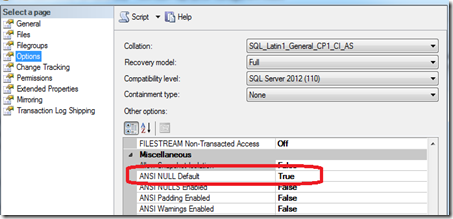
If the both options are off , is_ansi_null_default_on value of the database will be taken when tables are created.

SELECT name,is_ansi_null_default_on FROM sys.databases
You can change this option from the database options page as shown below.
image

The setting of SET ANSI_NULL_DFLT_ON does not apply when tables are created using the SELECT INTO statement. It applies only for CREATE TABLE and ALTER TABLE statements.


SET IMPLICIT_TRANSACTIONS ON


SET NOCOUNT


SET DEADLOCK_PRIORITY


SET CONCAT_NULL_YIELDS_NULL


SET FORCEPLAN


SET PARSEONLY


SET IDENTITY_INSERT


SET FMTONLY

Monday, April 1, 2013

SET FMTONLY

This is the eight post of SET Statement series

when SET FMTONLY set to ON, query will return only metadata to the client. This setting can be used to test the format of the response without actually running the query.

USE AdventureWorks2012;
GO
SET FMTONLY ON
;
GO
SELECT
*
FROM Production.Product;
GO
SET FMTONLY OFF
;
GO

Output of this is,


image


So there will be no rows returned.


However, this SET option is set to depreciate with SQL Server 2012.


Previous posts of this series,


SET IMPLICIT_TRANSACTIONS ON


SET NOCOUNT


SET DEADLOCK_PRIORITY


SET CONCAT_NULL_YIELDS_NULL


SET FORCEPLAN


SET PARSEONLY


SET IDENTITY_INSERT

Sunday, March 31, 2013

SET IDENTITY_INSERT

This is the seventh post of SET Statement series.

SET IDENTITY_INSERT is one of the most commonly used SET statement. SET IDENTITY_INSERT will be set to ON when you need to be inserted into the identity column of a table explicitly.

CREATE TABLE Department
(DeptID INT IDENTITY(1,1) PRIMARY KEY CLUSTERED,
DepartmentName Varchar(50)
)


INSERT INTO Department
(DepartmentName)
VALUES
('Account'),
(
'Human Resources')


If you select from the table you will see DeptID column is populated with requital value.

image

Now what if we have a requirement of inserting deptid explicitly.

INSERT INTO Department
(DeptID,DepartmentName)
VALUES
(5,'Transport')

this will return an error as shown below.


Msg 544, Level 16, State 1, Line 2
Cannot insert explicit value for identity column in table 'Department' when IDENTITY_INSERT is set to OFF.


So to avoid this issue, you need to SET the IDENTITY_INSERT property on. This property is valid on for the session which enabled the IDENTITY_INSERT ON.

SET IDENTITY_INSERT  Department ON
INSERT INTO Department
(DeptID,DepartmentName)
VALUES
(5,'Transport')
SET IDENTITY_INSERT  Department OFF


If the value entered to the identity column is greater than the current identity value, after inserting new value value identity will be set to the new value. For example, if the current identity of the table is 5 and if you insert 100 to the identity column, next time you insert data without IDENTITY_INSERT option on, next value for the identity will be 101. However, if you are inserting a value less than the current identity value, current identity value remains.


To perform a IDENTITY INSERT you nee alter permission to the table not the write permission.


Previous posts of this series,

SET IMPLICIT_TRANSACTIONS ON

SET NOCOUNT

SET DEADLOCK_PRIORITY

SET CONCAT_NULL_YIELDS_NULL

SET FORCEPLAN


SET PARSEONLY

Saturday, March 30, 2013

SET PARSEONLY

This is the sixth post of SET Statement series.

When this set to on, SQL Server engine examines the syntax of each Transact-SQL statement and returns any error messages without compiling or executing the statement. By default this is OFF,

USE AdventureWorks2012
SET PARSEONLY ON

SELECT
SOH.SalesOrderID,SOH.OrderDate, P.ProductID,
P.Name,SOD.OrderQty,SOD.LineTotal FROM Sales.SalesOrderDetail SOD
INNER JOIN Sales.SalesOrderHeader SOH ON SOH.SalesOrderID = SOH.SalesOrderID INNER JOIN Production.Product P ON SOD.ProductID = P.ProductID WHERE SOH.OrderDate = '2005-07-01'
AND P.ProductId = 712


When the above query is executed, no results will be displayed.


image


There will be obvious question where it can be used.


Let' us try to set this in a stored procedure.


CREATE PROC InsertProc
AS

SET PARSEONLY ON

SELECT
1


This will fail with following error.

Msg 1059, Level 15, State 1, Procedure InsertProc, Line 0
Cannot set or reset the 'parseonly' option within a procedure or function.


You cannot use the ‘PARSEONLY’ option in a procedure or function. Though this error refers to procedure and function, same error will generate if you try to set this option a trigger.

Previous posts of this series,

SET IMPLICIT_TRANSACTIONS ON

SET NOCOUNT

SET DEADLOCK_PRIORITY

SET CONCAT_NULL_YIELDS_NULL

SET FORCEPLAN

Monday, March 25, 2013

SET FORCEPLAN

Fifth post of SET Statement series.

Let us execute the following query.

USE AdventureWorks2012
GO

SELECT
SOH.SalesOrderID,SOH.OrderDate, P.ProductID, P.Name,SOD.OrderQty,SOD.LineTotal FROM Sales.SalesOrderDetail SOD
INNER JOIN Sales.SalesOrderHeader SOH ON SOH.SalesOrderID = SOH.SalesOrderID
INNER JOIN Production.Product P ON SOD.ProductID = P.ProductID
WHERE SOH.OrderDate = '2005-07-01'
AND P.ProductId = 712

Following will be the query execution plan.


image


You can see that query plan does not depends on the order of the tables in the query. for example, though you have SalesOrderDetail table in the query, query plan first pick the products table since that query plan will be the best.


If you set the above set option to ON, then the query plan will change. as shown below.


image


So when the SET FORCEPLAN is set to ON,SQL Server query optimizer processes a join in the same order as the tables appear in the FROM clause of a query. In addition, setting FORCEPLAN to ON forces the use of a nested loop join unless other types of joins are required to construct a plan for the query.


However,when using this option, you need to make sure that after setting it to ON, your query performs better.


Previous posts of this series,

SET IMPLICIT_TRANSACTIONS ON

SET NOCOUNT

SET DEADLOCK_PRIORITY

SET CONCAT_NULL_YIELDS_NULL

Friday, March 15, 2013

SET CONCAT_NULL_YIELDS_NULL

Fourth post of SET Statement series.

When concantating multiple columns you always need to verify whether your columns have null values. If they have null values when you concantating them, final result also will become NULL as shown below.

SELECT 'dbfriend' + NULL ;
GO

By default output of this is NULL. However, you can change this behavior by setting the CONCAT_NUL_YIELDS_NULL to OFF (default setting is ON)

SET CONCAT_NULL_YIELDS_NULL OFF;
GO
SELECT
'dbfriend' + NULL ;
GO

Now the output of the above query is dbfriend not NULL.


Let us check this when you are concantating table columns.

USE AdventureWorks2012
GO

SELECT
title + '' +
firstname + '' +
MiddleName + '' +
lastname Full_Name
FROM Person.Person

Result for the above query where you can see lot of null values as either of one column has a null values final result will be null.


image


Let us run this with the setting enable.

SET CONCAT_NULL_YIELDS_NULL OFF;
GO
USE
AdventureWorks2012
GO

SELECT
title + '' +
firstname + '' +
MiddleName + '' +
lastname Full_Name
FROM Person.Person

And the result is shown below and null values are gone!


image


With SQL Server 2012 we have new feature called CONCAT to support this. So in SQL Server 2012, you don’t need to set this setting.


Previous posts of this series,

SET IMPLICIT_TRANSACTIONS ON

SET NOCOUNT

SET DEADLOCK_PRIORITY

Thursday, March 14, 2013

SET DEADLOCK_PRIORITY

This is the third post if the SET statement series.

You can set the DEADLOCK_PRIORITY from labels or from numeric values. Numeric ranges are from -10 to 10 while labels are HIGH, LOW or NORMAL and LOW maps to -5, NORMAL to 0, and HIGH to 5 of the numeric scale.

This option is available from SQL Server 2005.

To create a deadlock for testing purposes you can execute the below TSQL script:

-- 1) Create Objects for Deadlock Example
USE TempDB
GO
CREATE TABLE
foo (col1 INT)
INSERT foo SELECT 1
CREATE TABLE bar (col1 INT)
INSERT bar SELECT 1
-- 2) Run in first connection and in my server this connection was SPID 59

BEGIN TRAN
UPDATE foo SET col1 = 1

-- 3) Run in second connection and in my server this connection was SPID 62
BEGIN TRAN
UPDATE bar SET col1 = 1
UPDATE foo SET col1 = 1
-- 4) Run in first connection
UPDATE bar SET col1 = 1

When the above query is executed, as expected a deadlock occurred and it happened to be the SPID 59 :


Msg 1205, Level 13, State 45, Line 1 Transaction (Process ID 59) was deadlocked on lock resources with another process and has been chosen as the deadlock victim. Rerun the transaction.

Let us assume that I do not want 59 to become the victim and instead have another connection (62) become the victim. I will add the following SET command to my SPID 59 :

SET DEADLOCK_PRIORITY HIGH;
GO
UPDATE bar SET col1 = 1

Now when I run the first TSQL script SPID 62 will become a victim while SPID 59 will be completed:

Msg 1205, Level 13, State 45, Line 3 Transaction (Process ID 62) was deadlocked on lock resources with another process and has been chosen as the deadlock victim. Rerun the transaction.

Previous articles of this series,

SET IMPLICIT_TRANSACTIONS ON

SET NOCOUNT

SET NOCOUNT

Continuing on the series on SET statements, this time it is SET NOCOUNT.

Let us run the following query.

USE AdventureWorks2012
GO

SELECT
* FROM Sales.SalesOrderHeader

Of course you will see the output and if you look at messages tab you will see,


(31465 row(s) affected)


So when an query is executed DONE_IN_PROC messages is sent to the client. A DONEINPROC token is sent for each executed SQL statement within a stored procedure.


Token Stream-Specific Rules:

TokenType        =   BYTE
Status = USHORT
CurCmd = USHORT
DoneRowCount = LONG / ULONGLONG;
Details are here for token DONE_IN_PROC. 
When SET NOCUNT is set to ON ( default value is OFF), this token will not be sent. Since this token is sent for each and every statement, by setting this to ON, you can save lot of network traffic. 
SET NOCOUNT ON

USE
AdventureWorks2012
GO

SELECT
* FROM Sales.SalesOrderHeader

When this is executed at the messages tab you will see following results.


Command(s) completed successfully.


However, @@ROWCOUNT will not be effected with SET NOCOUNT ON setting.


Previous articles of this series,


SET IMPLICIT_TRANSACTIONS ON

Wednesday, March 13, 2013

SET IMPLICIT_TRANSACTIONS ON


SET IMPLICIT_TRANSACTIONS ON sets the transactions to use COMMIT before a transaction is committed. Default setting is OFF and when it is set to OFF transactions will be committed automatically.

When the setting is set to on, following statements will start a  transaction implicitly.


ALTER TABLE CREATE DELETE DROP
FETCH GRANT INSERT OPEN
REVOKE SELECT TRUNCATE UPDATE
MERGE ALTER SERVER    

Transactions that are automatically opened as the result of this setting being ON must be explicitly committed or rolled back by the user at the end of the transaction. Otherwise, the transaction and all of the data changes it contains are rolled back when the user disconnects. After a transaction is committed, executing one of the statements above starts a new transaction.

SET IMPLICIT_TRANSACTIONS ON

INSERT INTO
Emp
(Name,AddressI,City)
VALUES
('Name','Add','C1')

SELECT @@TRANCOUNT

Output of this is 1 which mean there is one transaction is open which was created by setting IMPLICIT_TRANSACTIONS to ON.


Above transaction has to be finished with COMMIT or ROLLBACK.


You can monitor the trancount from perfmon as well.


image


User Option Setting


You have a setting for implicit transaction in the server properties in connection page as shown below.


image


This setting is for dblib network library connections and this setting has no effect on ODBC or OLEDB connections.


Also, you can set the above setting by running following script.


EXEC sys.sp_configure N'user options', N'2'
GO
RECONFIGURE WITH OVERRIDE
GO

You are not able to set this if you have contained databases in the Server.


Msg 12830, Level 16, State 1, Procedure sp_configure, Line 166
The sp_configure 'user options' setting must be zero if the Database Engine has contained databases.


However, you can set SET IMPLICIT_TRANSACTIONS ON inside a contained databases without any issues.

Monday, March 11, 2013

SET Statements

T-SQL programming language behavior will change  with the SET statement you are specifying. There are around 40 SET statements during next blog post, I will be discussing about those settings in coming posts.