Translate

Showing posts with label Myths. Show all posts

Saturday, April 6, 2013

BIT Column Indexes

There are two myths around BIT column indexes.

Myth #1. Cannot create indexes on BIT columns.

Not sure how this was evolved. But this not absolutely false. Let us try it.

USE tempdb
GO

CREATE TABLE
Employee
(ID INT IDENTITY PRIMARY KEY CLUSTERED,
Name Varchar(50),
Status BIT
)

CREATE INDEX idx_employee_status ON Employee(Status)

Above statement is successful and you can create the index is created.


image


I verified this in SQL Server 2000 SP4 and it was successful.

Myth #2. BIT Column indexes are not useful.


Above argument has a base. BIT column can have possible three values, 0, 1 and NULL. Therefore index selectivity is low.  For example, consider the above table which has 10 million rows and status will say whether these are active or not.  In large table, active records will be very less so active = 0X1 will be highly selective.

Monday, July 30, 2012

Database Snapshots in Index Rebuilding


Yesterday I posted a blog about database snapshot and this is somewhat an extension to it. Yesterday we checked the behavior of a database snapshot with database backups. Now let us check it’s relation with Indexes.

Let us create a database and relevant table along with indexes.

image

Then I manually insert data so that my indexes are fragmented which is shown below.

image

Then I created snapshot and as yesterday verified the file sizes.

image

Then did a index rebuild and verified the file sizes again.

image

So the sizes are increased which means index rebuild does effect the database snapshots.

Saturday, July 28, 2012

Database Snapshot, is it only for Data Modifications?

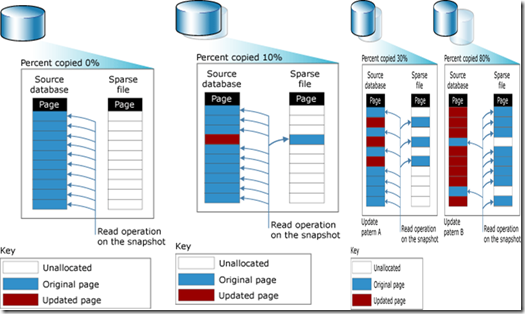
Database Snapshot consists of a read-only static view of the database without including the uncommitted transactions.

If I put all of the above stuff in one picture, it will be like this.
image

In simple terms, when we create a database snapshot, empty spare file will be created As and when data is changed in the database, data pages are moved to the sparse file. So if you are reading from the snapshot, modified data pages will be read from the sparse file while non-modified file pages are read from the source database.

Now the question is, Is it only the data modifications are sent to the sparse file.

Let us examine this.
 
Let me create a database and some sample data for it.
 
image

Then I will take a full back and update few data as shown below.

image

Now then, back to the business end.

Let us create a database snapshot.

image

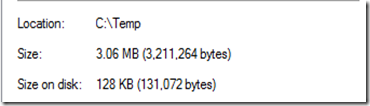
After creating this let us see the size of the snap shot file size.
image

So the file size of the snapshot file is 3.06 MB but size on the disk is 128KB which is actual data size.

Now let me take another backup.

image

Let us see the file size again.

image

What! how come, I didn’t do any data changes, still the size on disk has increased more than twice without any data modification.

Explanation

When there are data changes after a full backup, it will set a bit value in page so that for differential backup it can identify which pages need to taken into the differential backup. This value will be reset with a full backup. Since you have done a full backup after the database snapshot creation, full backup will modify the data page. So database snapshot is not only for the data modification but anything changes to the data page will move the page to the database snapshot.

Monday, July 16, 2012

Is Truncate a DDL Statement or DML Statement?

Since operational wise or user experience wise, truncate is equal to DELETE entire table and DELETE is a DML statement, most people think that Truncate is DML statement.

So let us verify this.

Let us create a table to play around.

image

Let me create user with DML permissions.

image

Now using this user let us truncate the employee table.

image

You will end up with an error as shown below.

Msg 1088, Level 16, State 7, Line 2
Cannot find the object "Employee" because it does not exist or you do not have
permissions.

You will end up with an error as shown below.

Now let us create a user with DDL permission.

image

Let us truncate the table using this user.

image

since this is a success Truncate is a DDL statement.

Wednesday, July 11, 2012

Granting Column Wise Permission

You might know that you have the option of allocating permission Column wise. For example, you can GRANT permission to another user so that he can select Name column of the Employee table while does not have permission to select Salary column.

Let us assume with following case.

I have a table ,( let us say , Production.ProductCategory)  I grant select permission for two columns while deny permission for the entire table for a user as shown below.

image

So the question is , what is the effective rights. Can he select those columns or will he be denied on select permission?

What is the rule for security,

Denial of access always out weights a grant of access, with the exception of the sysadmin role at server.

If you go by the above rule, the user should not be able to access those two columns. But to your surprise, by default user can select those columns.

So what is the concept behind this?

MSDN says,

A table-level DENY does not take precedence over a column-level GRANT. This inconsistency in the permissions hierarchy has been preserved for backward compatibility.

Can you change this.

Yes you can by running following script.

image

However, you need to restart SQL Server instance after running the above query.