Translate

Showing posts with label Bugs. Show all posts

Monday, September 14, 2015

PolyBase Technology, Instance Feature or Common Feature?

PolyBase is a new feature added to the SQL Server 2016. This feature includes PolyBase technology that enables truly integrated querying across Hadoop non-relational data and SQL Server relational data using standard T-SQL statements.

While installing PolyBase, it is listed under the instance feature.

image

However, when this feature is selected, in the next screen you will get this error screen.

image

This means this is not a instance feature.

Monday, May 18, 2015

Microsoft Releases New Version of SP1 for SQL Server 2014

The much-troubled Service Pack 1 for SQL Server 2014 has its latest revision, and allegedly resolves significant problems that made SQL stop working for numerous customers.

The service pack originally was originally released last month, but Microsoft pulled it on that same month because of an installation problem. The updated SP1 (build 12.0.4100.1) is now available at this download page, dated 5/14/2015.

More at https://virtualizationreview.com/articles/2015/05/18/microsoft-releases-new-version-of-sp1-for-sql-server-2014.aspx

Monday, April 20, 2015

Microsoft Halts SQL Server 2014 SP1 Downloads


A bug surfaces soon after the release of SQL Server 2014's first service pack, forcing Microsoft to temporarily disable downloads of the update.

Microsoft's attempt at squashing SQL Server 2014 bugs ran into a bug of its own.

The company released SQL Server Service Pack 1 (SP1) on the April 15 anniversary of the database software's launch. Today, Microsoft is hitting the pause button after a discovering an issue.

"The SQL SSIS team has found an issue with SP1 installation if SSIS.

http://www.eweek.com/database/microsoft-halts-sql-server-2014-sp1-downloads.html

Wednesday, July 23, 2014

Cannot show the editor for this task.

I got this error in SSIS when I try to open Execute SQL Task.


image

Then I tried to open already configured Execute SQL Task in some other SSIS packages. Still the error exists. I was wondering this is an error in SQL Server 2014 so I installed SQL Server 2012 and tried but it was no difference.

So the work around is by clicking F4 and enter the configuration values in the Properties box.

image

Monday, May 27, 2013

Compress Backup Information in Backup and Restore Events

In SSMS, there is report called , “Backup and Restore Events” report.

image

if you consider latest backups backup size are almost similar. (~  339 MB) However, if you really see the physical file size, it is 79 MB.

So the report and physical file size is different.

You can measure the file size by running a query.

SELECT 
bs.media_set_id,
bs.backup_finish_date,
bs.type,
bs.backup_size / 1024 backup_size_KB,
bs.compressed_backup_size / 1024 compressed_backup_size_KB,
mf.physical_device_name
FROM dbo.backupset AS bs
INNER JOIN dbo.backupmediafamily AS mf
ON bs.media_set_id = mf.media_set_id
WHERE database_name = 'AdventureWorks2012'
ORDER BY backup_finish_date DESC;
GO

image


So , here you can see the correct value can be obtained you query compressed_backup_size column rather than querying backup_size column. so it seems like, SSMS report is using backup_size column rather than compressed_backup_size column which seems to be BUG!

Friday, May 3, 2013

Search in MongoDB

I came across this incidents while working on some MongoDB. I am not sure it is the expected behavior, so thought of posting it.

I have a collection called zipcodes which has following attributes.

image

So, I need to get the count for two state , I executed following script.

image

it returned me  1596 which was incorrect. Then started to go more into details, I started with by interchanging the values and then I got a different results.

image

Then I remove first row and executed it again.

image

Oops, I got the same values as before. Then I realize that, whenever we pass values for same attribute only the last one will be taken in. So for the above case I should us $in.

This behavior is same for insert, update, find etc.

Sunday, April 21, 2013

INCLUDE Index Column Order

You can create an include index as shown below.

USE [AdventureWorks2012]
GO

CREATE UNIQUE NONCLUSTERED INDEX
[AK_Product_ProductNumber] ON [Production].[Product]
(
[ProductNumber] ASC
)
INCLUDE (
[Class],
[Color]
)
GO

So in this there are two columns are included in INCLUDE clause. So the question is, will the column order matters?


Since it is not only the columns in the SELECT list that need to be present in the INCLUDE clause, order of those columns is irrelevant.


However, if you look the UI of INCLUDE index, you will see following screen.


image


In the above screen, you can see that there is an option of changing the order by pressing Move Up or Move Down buttons.


So the question is, if the order of the columns is irrelevant, why you have an option of changing it?

Monday, December 31, 2012

Too Many VLFs

Transaction Log consists of Virtual Log Files. When transaction log is increase virtual log files are crated according to following table. More info here

Log Size # of VLFs
64MB and up to 64MB 4
64MB and up to 1GB 8
larger than 1GB 16

Too many VLFs will lead to some problems like, backups will take long time, replication latency will be high. In fact, I have a bad experience, when one of the database has high replication latency and reason for that is high VLFs.

In SQL Server 2012, there is a new feature when the VLFs are more than 10,000 there will be an warning in the error log once the server startup.

During the CTP3 of Denali, this threshold was set to 1,000 but was increased at the RTM. However, Microsoft has forgot to reset the warning message. Winking smile

Here is how I recreate this.

image

I verified number of VLFs by DBCC LOGINFO(). I verified that there are no warning when log file reached the 1000 VLFs.

After reaching 10,000 I saw the error message but it says database has  more than 1000 virtual log files.

image

Saturday, October 20, 2012

SSMS Report Security Bug

To view SSMS reports there are few security roles you need to grant. In SSMS there are three types of reports.

1. Server Reports

2. Database Reports

3. SQL Server Agent Reports

To view Server Reports you need VIEW SERVER STATE permission. To view database reports, you need db_datareader permissions. However, if you have any other permissions, following is what you see.

image

As expected, Standard Reports are disabled but reports which were opened before are in the list!! and you can run those reports as well.

Monday, July 16, 2012

Increasing the LOG file size

I was doing some research into VLF and was trying increasing the LOG files with different sizes.

I came across with wired situation where when ever I crease the log size by 4GB, it increases with no time, but I go with less size it takes few or more seconds.

Here is the test.

Simply I created the database with 1 GB log file.

image

Then I expand the log file with 1-7 GBs and every time I re-create the database.

image

Here are the results.

image

It is almost a straight line except for 4 GB.

Let us see the physical log growth at each instances.

image

So surely there is something wrong when you are incrementing by 4GB. When searching I found the blog post from Paul where he confirms that this is a BUG.

I confirmed that this is resolved in SQL Server 2012.

Saturday, June 30, 2012

Jobs Execution Status Report

I came across new two new reports in SSMS. (This report is available in SQL Server 2008 R2 and onwards). Those are coming under SQL Server Agent as shown below.


image

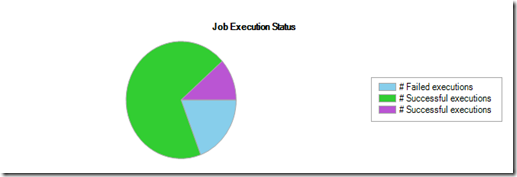
This report gave me this.

image

You will see in the key, there are two of # Successful Executions in green and in purple color!. I have never seen a chart key like this. Have you?

Difference between the purple and green is, Green “# Successful execution” for the successfully completed jobs while the purple one is for the canceled jobs. Should it be nice, if we have a different text for this, rather than having the same name for both.

Wednesday, March 7, 2012

Collation is Missing when Scripting the Database

You might know that you are not allow to modify the Collation after creating a database.

So you use the scripting option for the database you will see that collation is missing in the script.

Following is the script database create with Danish_Norwegian_CI_AS collation.

image

However, you can see that collation is not mention in the above script.

If you want to script you need to explicitly mention the COLLATE as shown below.

image

Friday, March 2, 2012

Can we set model database to READ ONLY ?

When I saw this question, I thought “NO WAY”. However, I gave it a try.

To my surprise, I was able to set READ ONLY to model database.

Then I created the database and it was a read only database which didn’t surprise me.

image

You can see, I was able to to set model to read only and when I created a new database it is read only.

However, after restarting SQL Server , tempdb will not be in READ ONLY.

This is the surprise.

If you check http://msdn.microsoft.com/en-us/library/ms186388.aspx#2 , it says you can’t set model database to read only mode.

image

Thursday, February 23, 2012

Same feature but different order, why ?

I got this issue while creating an SQL Server Agent Alert.  When I want to select the database, it came to my notice that databases are not in order. I am not sure what the order is.

image

Same set of features are available in perfmon but databases are nicely ordered.

image

This does not apply only to log space used but for many other counters in alert.

Saturday, February 18, 2012

SSMS BUG

I have seen this bug for a while and in several SQL Server version. Seems like Microsoft doesn’t have plans to fix this,

If you have a database in restoring mode, right click the database just keep the mouse over at the Reports option (NO you don’t have to click it Sad smile) you will be getting an error. Good thing is it won’t crash the SSMS.

image

Yes it is an unhandled exception.

Wednesday, December 14, 2011

Two SPIDs in sp_who2


sp_who2 is function you can use to identify who (Login) is running at what (DBName, command) from where (SPID & Host) as you can see in the following image.

image

If you look closely, you will see that there are two SPID columns with same values. By looking at them, they are same So let us see the coding of this.

image

So you would see that SPID column is convert(char(5),spid) so why on earth same column twice.

Just see the comment after second SPID.

Handy extra for right-scrolling users.

Do you agree. I am not Smile .

Saturday, August 27, 2011

Disk Usage Report in SSMS

Reports in SSMS are very helpful when monitoring SQL Server. But today I encounter an issue with one of the reports, which is Disk Usage Report.


imageimage

Above is the Transaction Log space usage report taken for same database but for different times. Actually, second one was after taking a log backup. After seeing this report my immediate reaction was log backup has not cleared the log. So I ran another log backup and results are similar. But when you analyze these graphs carefully you would see that in the first graph, Green is Used and in the second Green is Unused and Blue is vice-versa. (Oops).

I did few more research into this to find out the tipping point and this is happening after 50% percent. See the image below.

image

image

image

image

Now it is 50-50 and next one is,

image

image

You can clearly see the change. I verified this is the same behavior in SQL Server 2008 R2 as well.

Friday, June 24, 2011

How long does it take to fix a bug

In the development cycle, it is needless to less we all in some part of our carrier, have injected  bugs in different scale. However, when we were told it is a bug, I am sure most of you try to fix it or prioritize it to fix it.

But can you imagine, if there is a bug in SQL Server for more than 5 years, ranging three SQL Server Products (SQL Server 2005, SQL Server 2008 and R2).

This bug is in CTE.

Now CTE was introduced primarily to support recursive queries.

Let’s say I have a table and data like this.

image

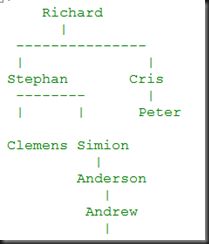
So I have a hierarchy as following.

image

Let’s assume that, you need to retrieve, only two levels starting from Richard, here is the query you should use.

image

so number of levels are handled by , MAXRECURSION = 2 option. In this of course, you will get the result but also and ERROR!!!,

yes, error says,

Msg 530, Level 16, State 1, Line 1
The statement terminated. The maximum recursion 2 has been exhausted before statement completion.

You can say that since it giving the correct result, what is the big deal about this. But the problem here is, since it is a Level 16 error, if you are using this inside of your code, your code will throw an exception.

You have a workaround which I have given in my sample code at the end of this post.

Now this error first appeared in SQL Server 2005 and Microsoft has make sure that they don’t fix this so you can see the same bug in SQL Server 2008 and in R2. I got to know that this was initially reported in 2002 when SQL Server 2005 CTP was released. So it is nine years now.

To confirm the stuff, I checked this in Denali CTP1. Guess what, still this issue in the backlog.

error.cg

Download sample code from here

Saturday, March 12, 2011

Another reason why you should not trust UIs


SQL Server Management Studio (SSMS) is nice tool, but there are instances where it will mislead you. This is one of them I found.

Every DBA knows that @@SPID will returns the session ID of the current user process.

You can view the SPID by running following query.

SELECT @@SPID

Apart from this you can use the SSMS to view the SPID as well. If you look down the tool bar of the query window of the SSMS as shown below.

image

Now, theoretically @@SPID and above value should be same, which you can see from image below

image

Let me restart the SQL Server instance and let us check what will happen to the above query now.

image

Now then, it is a contradiction. Obviously, @@SPID cannot be wrong and it is the SSMS the culprit, where SSMS won’t refresh.

So the conclusion, don’t trust SSMS too much.

Wednesday, November 17, 2010

Drop-Add-Drop-Add .. Column of SQL Server table

This error was encountered by one of our team mates. His task was to simply add three columns to the table and populate data on them. So he has written a rollback script to drop this column. While testing he executed these scripts few times and he noticed that it was failing at the 6th instance. He was able to recover this by doing a Index Rebuild.

I was trying to figure out by writing an sample script for this but took little while.

SET NOCOUNT ON
IF OBJECT_ID('dbo.InitTable') IS NOT NULL
DROP TABLE InitTable
CREATE
TABLE InitTable
(
ID Int identity (1,1) PRIMARY KEY CLUSTERED,
Data1 varchar(1000) NOT NULL,
Data2 varchar(1000) NOT NULL)

INSERT INTO InitTable
(Data1,Data2)
VALUES
( REPLICATE('A' ,1000),
REPLICATE('B' ,1000))

DECLARE @LOOP_COUNT INT
DECLARE @MAX_LOOPS INT

DECLARE @DYNAMIC_SQL VARCHAR(8000)
SET @LOOP_COUNT = 1
SET @MAX_LOOPS = 1500

WHILE @LOOP_COUNT <= @MAX_LOOPS BEGIN SET @DYNAMIC_SQL = 'ALTER TABLE dbo.InitTable ADD ' + 'Data3 [varchar](400) NULL, ' + 'Data4 [varchar](400) NULL, ' + 'Data5 [varchar](400) NULL ' EXECUTE (@DYNAMIC_SQL) SET @DYNAMIC_SQL = 'Update InitTable' + ' SET Data3 = Replicate(''A'',400) ' + ' ,Data4 = Replicate(''B'',400)' + ' ,data5 = Replicate(''C'',400)' EXECUTE (@DYNAMIC_SQL) Alter table InitTable Alter Column Data3 varchar(400) NOT NULL Alter table InitTable Alter Column Data4 varchar(400) NOT NULL Alter table InitTable Alter Column Data5 varchar(400) NOT NULL Alter table InitTable drop column Data3 Alter table InitTable drop column Data4 Alter table InitTable drop column Data5 SET @LOOP_COUNT = @LOOP_COUNT + 1 END


So in the sixth loop this script is failing and also I notice if I commentet out following lines, this script is not failing at 6th instance but at the 11th instance.

Alter table InitTable
Alter Column Data3 varchar(400) NOT NULL

Alter table InitTable
Alter Column Data4 varchar(400) NOT NULL

Alter table InitTable
Alter Column Data5 varchar(400) NOT NULL


Things not are not finished my friends.
For updating you can see I have used 400 charactors, if I increased it to 1000 it is failing at different point. Guess what, if it is 1000 it is not failing at 6th but at 9th. Why why why? know whos, I gave it up.