Translate

Saturday, April 28, 2012

Important facts about SEQUENCES

SEQUENCE is introduced with SQL Server 2012 to replace IDENTITY worries of the users. There are two important facts about SEQUENCE.

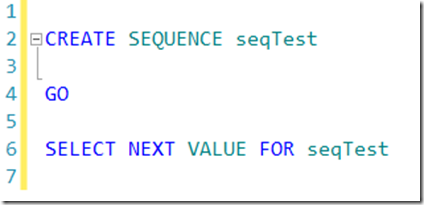
1. Following script will create a SEQUENCE named seqTest and in the line 7, it requests for the next value which will be the first value.
image

What do you think you will get as the value? Many answers will be either 0 or 1. But the value is

-9223372036854775808. I don’t think you guess it.

Let us go into the details. When you create a SEQUENCE without specifying the data type by default it will take BIGINT as the data type. If you didn’t specify the starting number it will start from the least value which is the –9223372036854775808 (least value for BIGINT is

-9,223,372,036,854,775,808).

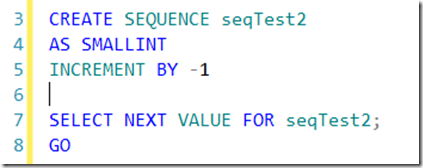
Let us look at another scenario with following script.
image

What do you think about the above script? Now, it’s type is SMALLINT while it has increment with –1. Since we have not specified any start values, it will start from the -32,768 which is the least value for SMALLINT data type and since our sequence specifies to INCREMENT BY –1, you will say that above script will generate an error. Sorry, you got it wrong again. Value will be 32767. When you create a sequence in, it will use the entire range available for the given data type unless you specify a range to use with the MINVALUE and MAXVALUE arguments. In addition to this, SQL Server will check whether the sequence is ascending or descending, and start the sequence at the minimum (ascending) or maximum (descending) value unless you use the START WITH argument.

Read more about SEQUENCE at http://msdn.microsoft.com/en-us/library/ff878091(v=SQL.110).aspx

Friday, April 27, 2012

Data Viewer in SQL Server 2012

Can you remember how you enabled data viewers in previous versions of SSIS? Well, that few clicks which seems like unnecessary. With SQL Server 2012 SSIS, simply right click the data flow path and select Enable Data Viewer and you are done.

image

Similarly, if you want to disable them follow the same path.

Tuesday, April 24, 2012

Monday, April 23, 2012

ALTER TABLE

In earlier versions, you can use later statement for tables, specifying four part table names. For example specifying the format .database.schema.table or the format ..schema.table will be succeeded. However, in SQL Server 2012 it will fail.

image

So in case you have referenced tables when altering them as a four part table name, make sure you change them. You might not use this type of statements directly however there are chances that applications, will use for ad-hoc queries.

Thursday, April 19, 2012

What's the difference between a temp table and table variable in SQL Server?

There are lot of discussions on the above topic after my previous post on this matter.

This link gives you answers to most of your questions. Hope this will help.

Wednesday, April 18, 2012

Finding Replication Publications For A Table

If you want to drop or rename a table, you will need to make ensure the table is not an article of a publication. If it is article for any publication, you need to find out what are those publications.This faq will give you a query to find tables which are used for what publications.

Sunday, April 15, 2012

DBCC CHECKIDENT

Though this not a big deal but thought of mentioning it here. DBCC CHECKIDENT has two options, RESEED and NORESEED.

If previous SQL Server versions output message of the DBCC CHECKIDENT will be similar for both the options as shown in the below image.

image

However, in SQL Server 2012 RESEED option will not provide the current IDENTITY valueas it is already specified with the parameter as shown below.

image

Saturday, April 14, 2012

Temp Tables Vs Table Variables Vs CTE

Temporary Tables (# tables) , table variables and CTEs are commonly used for storing data temporary.

Many people believe that Table Variable will be in the memory and Temp tables will be stored in the Tempdb database.

Let us see this. Following script will declare table variable and query the sys.objects in tempdb database.

image

So, declaring table variable it self will create a # table in tempdb throwing away the above myth.

Another myth is, table variable will be moved once the data load is high on the table variable. However, Following is a disk usage report taken for temp table and table variable.

image

Above report shows, that even for 5 rows, temp tables and table variable both have same in sizes which breaks the myth.

I did another test with #tables , table variables and CTE. Bellow graph is write transactions/sec for each scenario. So CTE does not use tempdb at all.

image

Following is from a KB article (http://support.microsoft.com/default.aspx?scid=kb;en-us;305977&Product=sql2k) but this applies to SQL server 2000. Couldn’t find any thing applies to 2008 or 2005.

Are table variables memory-only structures that are assured better performance as compared to temporary or permanent tables, because they are maintained in a database that resides on the physical disk?
A4: A table variable is not a memory-only structure. Because a table variable might hold more data than can fit in memory, it has to have a place on disk to store data. Table variables are created in the tempdb database similar to temporary tables. If memory is available, both table variables and temporary tables are created and processed while in memory (data cache).

Friday, April 13, 2012

Restrictions to NEXT VALUE FOR

Sequence object was introduced with SQL Server 2012. However there are last minute changes from RC0 to RTM. NEXT VALUE FOR function is used get the next value for the SEQUENCE object.

The NEXT VALUE FOR function is now disallowed when used in statements with

  • DISTINCT
  • UNION / UNION ALL
  • EXCEPT
  • NTERSECT
  • TOP
  • OFFSET
  • when the ROWCOUNT option is set

The NEXT VALUE FOR function is now disallowed in conditional expressions:

  • CASE
  • CHOOSE
  • COALESCE
  • IIF
  • ISNULL
  • NULLIF

The full list of restrictions are documented in BOL.

Usage of NEXT VALUE FOR only allowed in the DEFAULT constraint for the target column and NEXT VALUE FOR cannot be used with the MERGE statement. If it is used with MERGE statement following error will be generated.

Msg 11742, Level 15, State 1, Procedure sampleProc Line 21 NEXT VALUE FOR function can only be used with MERGE if it is defined within a default constraint on the target table for insert actions. :

SQL Server 2012 RTM Cumulative Update 1

Microsoft has announced the release of SQL Server 2012 RTM Cumulative Update 1. SQL Server 2012 RTM Cumulative Update 1 incorporates 92 issues reported by 44 unique customers.

image


Successful release of Cumulative Update 1 is a testament to the commitment of the many teams within the SQL BU, who are finding solutions to provide a better customer experience.   The coordination, determination and execution between all the SQL BU teams was instrumental in continuing the SQL Sustained Engineering team’s long standing track record for on time release of Cumulative Updates.

image

The associated cumulative KB article has also been published.  Customers are directed to contact CSS to get the CU build or obtain the hotfix package through the new self-service feature by clicking on the “Hotfix Download Available” button found at the top of the KB article.

·        Public KB Article

·        Hotfix Download Location

·        SQL Server 2012 RTM CU1 Fix List

·        CU Website